A beautiful mockup sitting inside Figma or Canva feels almost alive. Clients look at those layouts and imagine customers already engaging with them. The missing piece is the translation from static artwork into a functioning site. That translation is where front end development becomes the bridge between idea and reality for businesses that want something usable, fast, and visually accurate.
The Power Behind Modern Design Tools
Most clients begin inside platforms shaped for visual problem solving. Figma supports real time collaboration, letting teams and owners work in the same file. Canva gives small businesses quick access to brand aligned layouts. Adobe XD creates precise multi screen flows.
Design Tools Clients Commonly Use
Tools that define the starting point of most client projects.
| Tool | Strength | Typical Use |
|---|---|---|
| Figma | Collaboration and prototyping | Full brand workflows, interface layouts |
| Canva | Templated visuals | Landing pages, hero sections, branding assets |
| Adobe XD | Precise interface mapping | Dashboards, multi step UX flows |
Bridging the Gap Between Design and Code
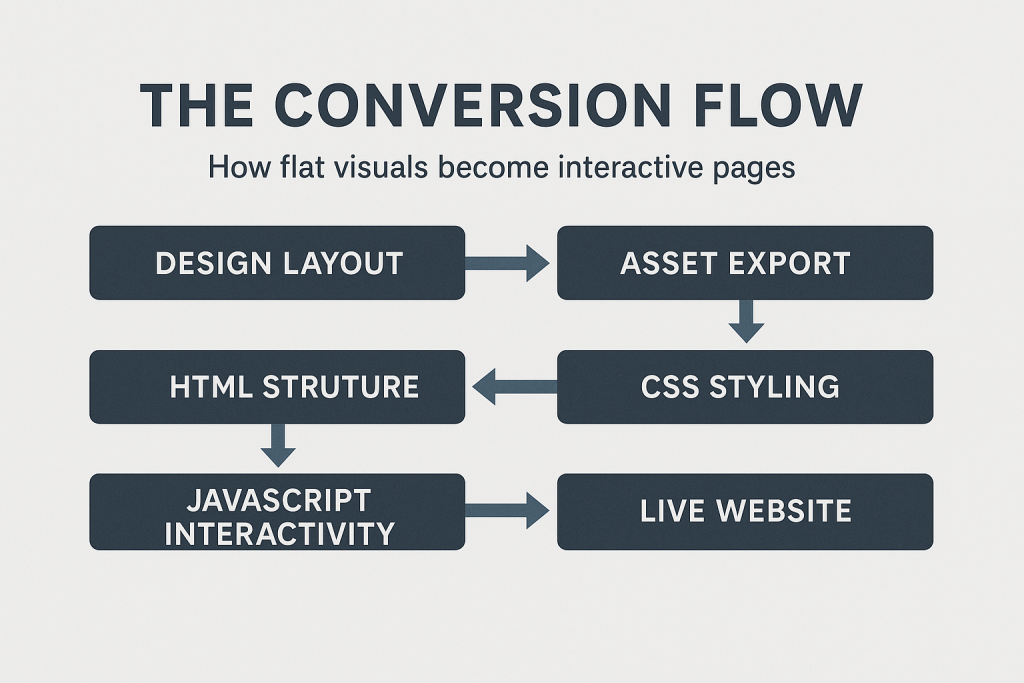
A design file is a visual suggestion. Code is the mechanical execution. HTML builds the structure, CSS applies the visual identity, and JavaScript animates the experience. The result is a site that looks like the mockup but behaves like a living interface.
Real World Applications for Client Projects
Businesses often bring their visuals but lack the technical build. A restaurant arrives with a Canva layout of their menu. A coach brings a Figma prototype for a personal brand site. A startup founder hands off an Adobe XD flow for a product dashboard. Each one needs a front-end professional who can convert those visuals into a polished, working experience.
Step by Step Guide: How Designs Become Live Sites
The build sequence is consistent no matter the design tool. Assets are exported. Structure is written. Styling is applied. Interactivity is layered in. Finally, everything is deployed and optimized.
The Production Stages Explained
What clients can expect during each phase.
| Stage | What Happens | Client View |
|---|---|---|
| Asset Export | Icons, images, fonts pulled from design | All visuals ready |
| HTML/WordPress Theme | Page structure created | Bare layout skeleton |
| CSS Styling | Colors, spacing, typography applied | Site matches the mockup |
| JavaScript Layer | Interaction and behavior added | Menus, forms, animations |
| Deployment | Site pushed live | Fully functional website |
Conclusion
Turning UX and UI designs into real websites lets clients move from imagination to implementation with accuracy and speed. This skill anchors modern front end work and helps you launch polished sites without losing their visual identity.
Further Reading and Resources
Titles below are clickable links, not decorative text.
W3C HTML Specification
Official HTML standards used to structure modern websites.
MDN CSS Documentation
Clear guidance for styling, layout systems, and responsive behavior.
MDN JavaScript Guide
The foundation of front end interactivity explained with practical examples.
Figma Help Center
Exporting assets, preparing design systems, and handing off files to developers.
Adobe XD User Guide
Instructions for organizing artboards and exporting assets for development.
Canva Help Center
How to export brand kits, images, and design layouts properly.