What is Podcast Generator?
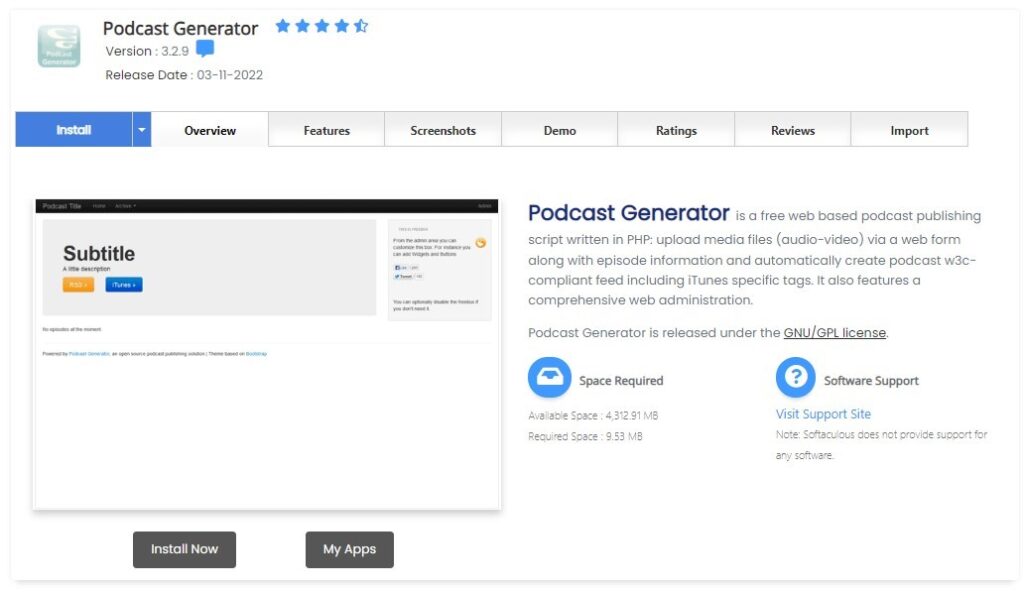
Podcast Generator is an open-source podcast publishing solution that’s designed to create and manage podcast feeds in a simple and intuitive manner. With its web-based interface, users can upload media files, automatically generate RSS feeds, and manage episodes without requiring any specialized knowledge.
Advantages of Using Podcast Generator:
- Simplicity: The software is designed for ease of use, making it suitable for both beginners and experienced podcasters.
- Customizable: Themes and plugins allow users to adjust the appearance and functionality to their liking.
- Multimedia Support: Accepts a wide range of media file types, not just audio.
- Web-Based: Access and manage your podcasts from anywhere with an internet connection.
Installing Podcast Generator Using Softaculous on Dark Horse Virtue Digital Footprint Hosting:
Step 1: Access Softaculous
- Log in to your Dark Horse Virtue Digital Footprint Hosting account.
- Navigate to the ‘Software’ section or directly locate ‘Softaculous Apps Installer‘.
- Open Softaculous.
Step 2: Locate Podcast Generator
- Utilize Softaculous’s search bar to type “Podcast Generator” or find it under the “Music” or “Multimedia” category.
- Click on Podcast Generator to access its overview page.
Step 3: Initiate the Installation

- Click on the ‘Install Now’ button.
- Opt for your desired protocol (http or https). If your domain boasts an SSL certificate, choosing ‘https’ is recommended.
- Select the domain or subdomain where you wish to install Podcast Generator.
- If your goal is to install on the main domain (e.g.,
podcasts.example.com), ensure the “In Directory” field remains empty. - Fill in necessary settings such as podcast name, administrative account details (always opt for a strong password), and other pertinent details.
- After ensuring all settings are correctly filled out, click the ‘Install’ button.
Step 4: Post-Installation Steps
- Upon successful installation, Softaculous will showcase a confirmation message with links to your Podcast Generator site and its admin dashboard.
- Use the credentials defined during installation to log into the Podcast Generator admin area. Here, you can commence uploading episodes, customizing settings, and more.
Tips for Using Podcast Generator:
- Optimization: To ensure faster loading times and better user experience, compress audio files before uploading.
- Metadata: Spend some time refining episode titles, descriptions, and tags for better discoverability.
- Backups: Regularly back up your Podcast Generator data to guard against any potential data losses.
- Stay Updated: Ensure that your Podcast Generator installation, as well as any added plugins or themes, remain updated for optimum performance and security.
Conclusion:
With Softaculous on Dark Horse Virtue Digital Footprint Hosting, deploying Podcast Generator becomes a breeze. This platform, known for its ease of use and robust features, equips creators with all they need to seamlessly share their voices and content with a wider audience.
[mwai-form-container id=”qbrgsgsls” theme=”ChatGPT”]