What is Dolibarr?
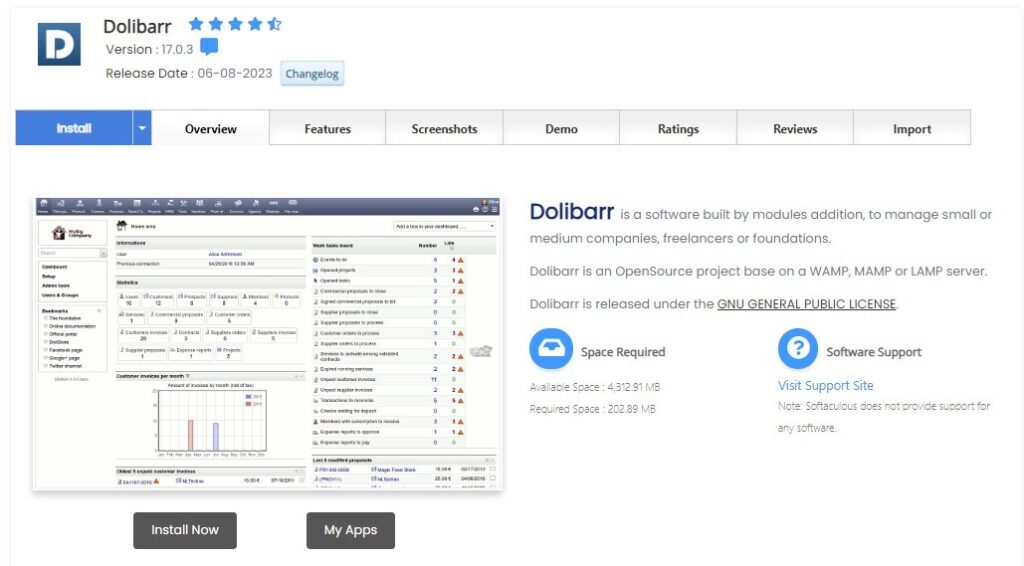
Dolibarr ERP & CRM is an open-source, modular software suite for managing your business operations, from customers and orders to invoices, inventory, and more. Whether you run a small business, a freelancer, a foundation, or a large company, Dolibarr offers a range of functionalities tailored to your needs.
Advantages of Using Dolibarr:
- Modular Approach: Users can activate only the modules they need, ensuring a clutter-free workspace.
- Web-Based: Being browser-based, you can access Dolibarr from anywhere without the need for special software.
- Community Support: A strong community of users and developers continually refine and extend Dolibarr’s capabilities.
- Customizable: The software can be tailored to fit industry-specific needs through plugins and themes.
Installing Dolibarr Using Softaculous on Dark Horse Virtue Digital Footprint Hosting:
Step 1: Access Softaculous
- Log in to your Dark Horse Virtue Digital Footprint Hosting control panel.
- Go to the ‘Software’ section or directly find ‘Softaculous Apps Installer‘ scroll meny in cPanel.
- Launch Softaculous.
Step 2: Search for Dolibarr
- In Softaculous, use the search function to type “Dolibarr” or locate it under the “ERP” category.
- Click on Dolibarr to move to its overview page.
Step 3: Kick off the Installation

- Press the ‘Install Now’ button.
- Choose your preferred protocol (http or https). If SSL is set up for your domain, ‘https’ is recommended.
- Select the domain or subdomain where you want Dolibarr installed.
- If installing on the main domain (e.g.,
management.example.com), keep the “In Directory” field blank. - Configure the required settings, including administrative account details (ensure to use a strong password) and other relevant data.
- After setting everything up, click the ‘Install’ button.
Step 4: Post-Installation Steps
- Once the installation concludes, Softaculous will display a confirmation, providing links to your Dolibarr platform and its admin area.
- Using the credentials established during installation, log into the Dolibarr dashboard. From here, you can activate modules, manage business operations, and customize your ERP & CRM system.
Tips for Using Dolibarr:
- Training: If new to ERP & CRM systems, consider investing time in Dolibarr’s official documentation or tutorials for a smoother learning curve.
- Modules: Regularly review and activate/deactivate modules to keep your Dolibarr setup aligned with business needs.
- Updates: Consistently ensure that Dolibarr, and any plugins or themes, are updated for the latest security patches and features.
- Backup: Given the crucial nature of the data, make regular backups of your Dolibarr installation to prevent potential losses.
Conclusion:
Setting up Dolibarr through Softaculous on Dark Horse Virtue Digital Footprint Hosting is straightforward and hassle-free. As an adaptable and powerful ERP & CRM tool, Dolibarr empowers businesses of all sizes to streamline operations, boost productivity, and foster growth.