What is YOURLS?
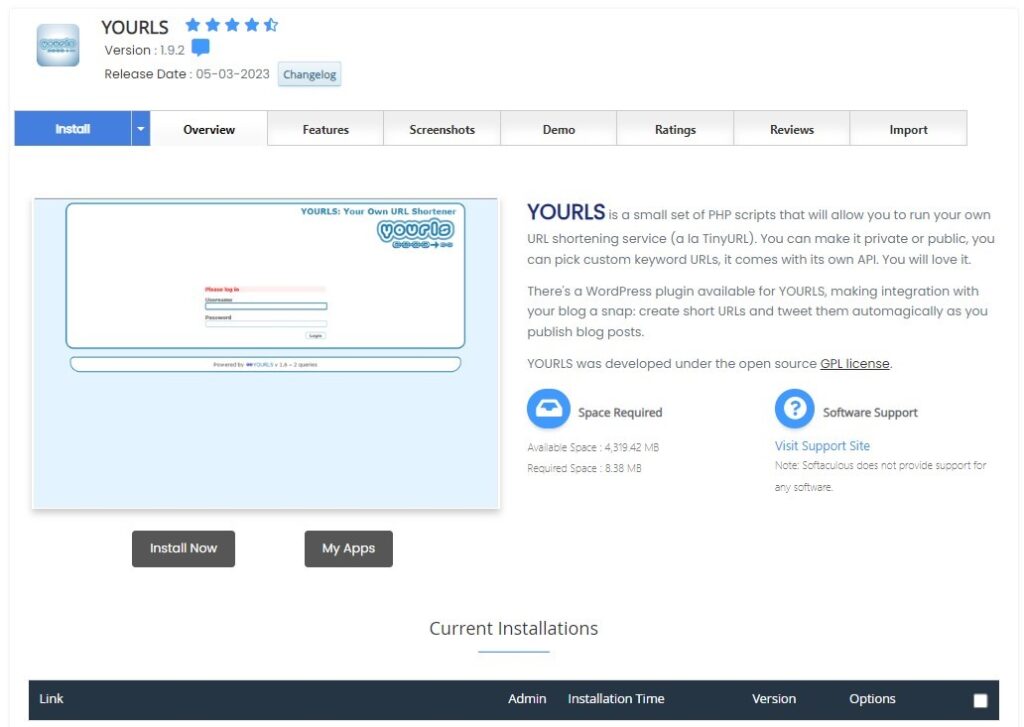
YOURLS stands for “Your Own URL Shortener.” It’s an open-source software that allows users to run their own URL shortening service, akin to Bitly or TinyURL. By using YOURLS, users can create custom short URLs, which is particularly useful for branding, analytics, and managing links efficiently.
Advantages of Using YOURLS:
- Custom Branding: Unlike third-party services, YOURLS allows users to utilize their own domain name for URL shortening.
- Analytics: YOURLS provides detailed statistics about who clicked your link, where they were from, and on which platform.
- Flexibility: You can set up private or public link shortening and integrate with many other services using plugins.
- No External Dependencies: By hosting it on your server, you control everything.
Installing YOURLS Using Softaculous on Dark Horse Virtue Digital Footprint Hosting:
Step 1: Access Softaculous
- Log in to your Dark Horse Virtue Digital Footprint Hosting account.
- Navigate to the ‘Software’ section or the direct link to ‘Softaculous Apps Installer‘ scroll menu in cPanel.
- Open Softaculous.
Step 2: Locate YOURLS
- In Softaculous, use the search bar to type “YOURLS” or locate it under relevant categories.
- Click on YOURLS to get to its overview page.
Step 3: Initiate Installation

- Click on the ‘Install Now’ button.
- Select the protocol (http or https). If you have an SSL certificate, opt for ‘https’.
- Pick the domain or subdomain where you wish to install YOURLS.
- Decide if you want YOURLS in a directory or the root. If you prefer the main domain (e.g.,
short.link), leave the “In Directory” field blank. - Configure site settings, such as the name of your link shortener.
- Set up the admin account with a username, password, and email. Remember to use a robust password!
- Fill in any additional settings as required.
- Click the ‘Install’ button at the bottom.
Step 4: After Installation
- Post successful installation, Softaculous will provide a confirmation along with links to your YOURLS site and the admin dashboard.
- Access the YOURLS dashboard using the provided credentials to start creating and managing your short URLs.
Tips for Using YOURLS:
- Plugins: Explore YOURLS’ range of plugins to enhance functionality. From social sharing to QR codes, there’s a lot you can add.
- Privacy: If you wish to keep your shortener private, configure the settings accordingly.
- Backup: Like any other web application, ensure regular backups of your YOURLS installation and database.
Conclusion:
By using Softaculous on Dark Horse Virtue Digital Footprint Hosting, installing YOURLS becomes a hassle-free task. Owning your URL shortener not only gives you full control but also offers numerous customization options. Whether you’re a brand looking to make branded short URLs or an individual seeking enhanced link management, YOURLS can be an excellent tool in your digital arsenal.