Managing a significant digital footprint involves a series of repetitive tasks. Whether it’s updating your site, backing up data, or running scripts, these tasks can consume a considerable amount of time and resources. Thankfully, Dark Horse Virtue Digital Footprint Hosting gives you access to a tool that can automate these tasks, right from the Advanced section of your cPanel. This tool is called ‘Cron Jobs.’

What are Cron Jobs?
Cron Jobs are scheduled tasks that the system executes at predefined times or intervals. They automate tasks that you would otherwise have to execute manually, making website management more efficient.
Accessing and Setting Up Cron Jobs
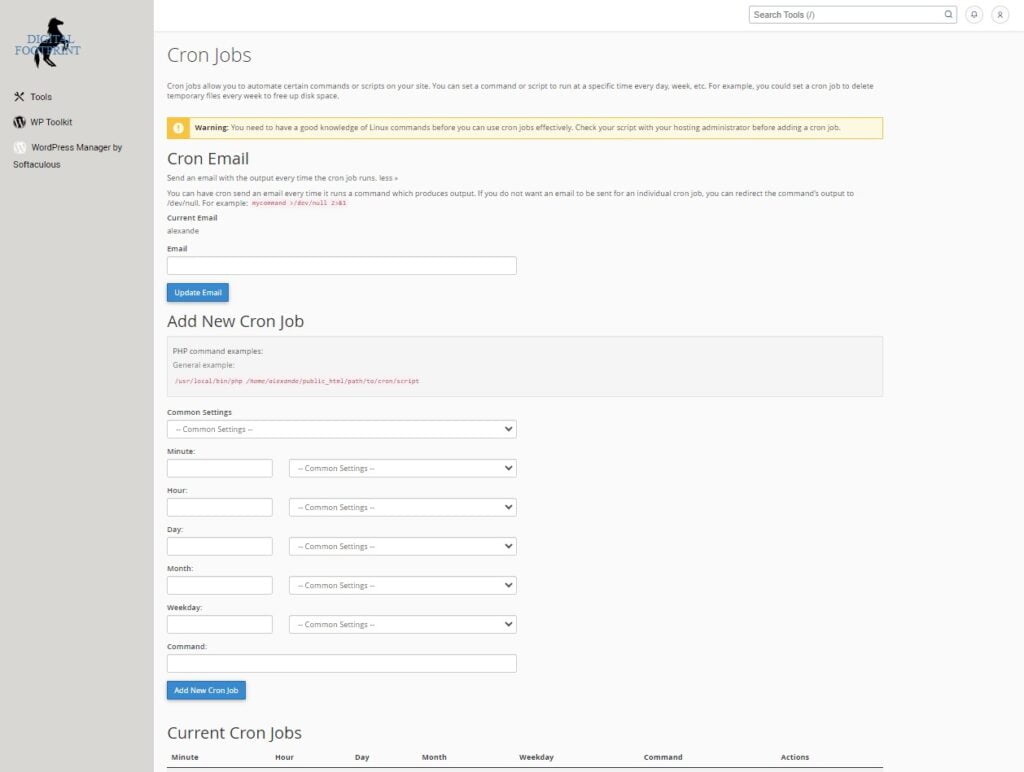
- Accessing Cron Jobs: Log in to your cPanel and navigate to the Advanced section. Here, you will find ‘Cron Jobs.’
- Adding a New Cron Job: Click on ‘Cron Jobs’ to open the interface. Here, you can set the schedule for the job using the common settings dropdown or by manually setting the minute, hour, day, month, and weekday.
- Command: In the ‘Command’ field, you input the command that you want the system to execute. This command could be a script for backup, updates, email dispatch, etc.
- Email Notifications: You can choose to receive an email each time the cron job runs. Simply input your email in the ‘Email’ field. This can be especially helpful for tracking and debugging purposes.
- Managing Cron Jobs: The interface also allows you to view, edit, and delete existing cron jobs. This can be handy when you need to modify tasks or remove outdated jobs.
Conclusion
Cron Jobs is a feature that can significantly enhance the way you manage your digital footprint. By automating repetitive tasks, you can devote more time to creating outstanding content and delivering value to your visitors, which is the ultimate goal.
Mastering Cron Jobs and other cPanel tools will not only improve your website management efficiency but also contribute positively to your overall digital footprint. If you have any questions or need further assistance with Cron Jobs or any other feature in your cPanel, Dark Horse Virtue Digital Footprint Hosting support is here to help. Don’t hesitate to reach out!